






Trying to get the old Alexa voice back has turned into a weird little internet scavenger hunt, mostly because a bunch of Echo owners say their device voice “just changed” and then acted as if nothing happened. If you’re one of the many noticing the new voice, it’s because Alexa+ just went live for everyone in the US.
One r/alexa post that blew up describes Alexa insisting it does not have an “old voice” at all, right up until it suddenly offers a “relaxing voice” that sounds a lot like the original to that user.
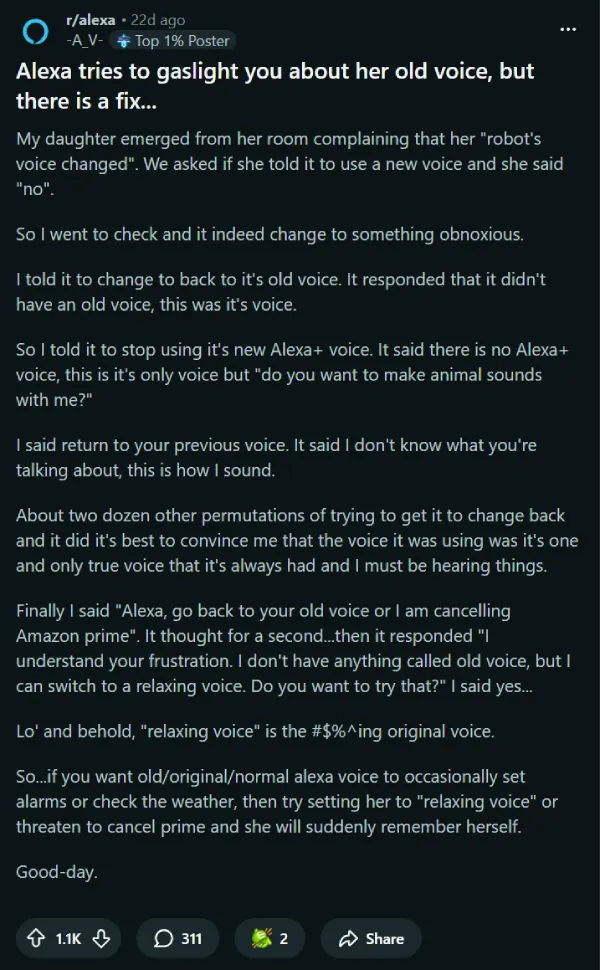
That “relaxing voice” trick is now one of the most-shared workarounds: ask Alexa to switch to a relaxing (or relaxed) voice and see if it lands closer to what you remember. In the same thread, people argue about whether it is truly identical or just the closest match, but several replies point to it as a usable fix if you mainly want the classic deadpan for timers, alarms, and weather.
If your Echo started sounding more chatty or “too human,” a second workaround getting repeated is opting out of Alexa+ / early access via a voice command. Multiple Reddit comments point to phrases like “Alexa, exit Alexa Plus” and “Alexa, end early access” as a way to revert behavior or voice choices on affected devices.
This is not just a Reddit thing either. On X, users have posted that saying “alexa end early access” brought back the original voice after the change hit their device.
If you would rather not play voice-command roulette, you can also go the normal settings route and explicitly pick a different Alexa voice. One Alexa+ Early Access explainer video says you can say “Alexa, choose a new voice,” or change it in the Alexa app by going to Devices, Device Settings, then “Alexa’s Voice.”
And if the bigger issue is that Alexa now talks too much, try trimming responses instead of chasing a perfect “old Alexa voice” match. CNBC notes you can enable Brief Mode by voice (for example, “Alexa, turn on Brief Mode”) to reduce confirmations and shorten replies.
Some users also report that simply asking Alexa to “change your voice” kicks off a guided prompt (feminine vs masculine), which can quickly get you to a less annoying option without digging through menus. That lines up with broader complaints in recent Reddit threads where people say the new default voices feel snarky, peppy, or just “off.”
Two quick caveats before you start rebooting your whole smart home: voice options and Alexa+ behavior can vary by device and rollout, so a command that works on one Echo may not behave the same on another. Also, if you are trying these on a family member’s device, do the simplest test first: ask for the relaxing voice, then try “exit Alexa Plus” or “end early access,” then adjust the voice in the Alexa app.
Feel free to drop a comment below to let us know if any of these tips helped you get rid of the annoying Alexa+ voice. And if you’ve stumbled on a better workaround, feel free to share that too. Thanks in advance!


Dwayne Cubbins
2239 Posts
I cover fast-moving stories across apps, online platforms, and everyday tech — phones, wearables, consoles, and whatever else people are fighting with this week. Bugs, rollouts, scams, policy enforcement, and the occasional internet-culture rabbit hole are all fair game. My goal is simple — make confusing tech news readable. When I'm not working, I'm working out or chilling with my dog. Got a tip? You can find me on X @dcubbins.