Apart from being your storage and backup companion, Google Photos also provides various helpful editing tools. One particularly useful feature is that it lets you create animations of your photos in just few clicks.
Animations is a group of pictures which are compiled together to make a slideshow. The benefit of animation is that you can create a slideshow for various purposes, starting from an educational perspective to reliving old memories.
You can select and combine different pictures in any definite order to generate a slideshow.
Now, if you want to use the animations feature in Google Photos but can’t figure out how, then our article will help you out. We will explain how you can efficiently use Google Photos to create animations in a few simple steps.
How to create animations in Google Photos
Animations are a little different from collages and movie features that Google Photos ha to offer. Unlike displaying the pictures slide by slide, animations will show the photos one after another.
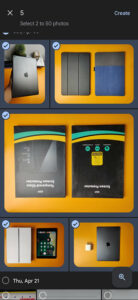
You can add up to 50 pictures while creating an animations. Hence, it is a great way to arrange multiple shots in the format.
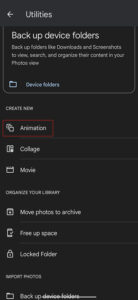
Follow the steps below to create an animation:
- Open Google Photos
- Go to the library tab
- Hover over to the utilities tab
- Swipe down to create a new section
- Select animations
- Add the desired pictures
- Tap ‘create’ to start the animation show


Click/tap to enlarge images
This concludes our guide on how to create animations in Google Photos. If you want to read more informative content related to Google Photos, click here.
PiunikaWeb started as purely an investigative tech journalism website with main focus on ‘breaking’ or ‘exclusive’ news. In no time, our stories got picked up by the likes of Forbes, Foxnews, Gizmodo, TechCrunch, Engadget, The Verge, Macrumors, and many others. Want to know more about us? Head here.

We stand out from the tech-media crowd because we break news stories; we mainly bring you stuff that you won’t find anywhere in the mainstream tech media. Our stories have been picked up by some of the world’s most popular websites and media outlets—more info is available here.

Asif Sameer
74 Posts
I am a technophile, writer, YouTuber, and SEO analyst who is insane about tech and enjoys experimenting with numerous devices. An engineer by degree but a writer from the heart.
Next article View Article